WordPress Login Security That Never Locks You Out
Progressive rate limiting stops brute force attacks while protecting legitimate users. No instant blocks, no admin lockouts, no downtime.
Understanding WordPress Brute Force Attacks
Brute force attacks attempt thousands of username/password combinations to gain unauthorized access to wp-admin.
How Attacks Work
- 1.Automated bots scan for WordPress sites
- 2.Try common usernames (admin, user, site name)
- 3.Test thousands of password combinations
- 4.Attempt 10-100+ logins per minute
- 5.Continue until blocked or successful
Why They Succeed
Weak Passwords
Common passwords like password123, admin123, or sitename2024 are cracked instantly.
No Rate Limiting
Without protection, attackers can try unlimited login attempts without consequences.
Predictable Usernames
Default usernames like admin or user reduce the attacker's work by 50%.
How Saurity Protects WordPress Logins
Multi-layered defense using progressive rate limiting, intelligent delays, and fail-safe mechanisms.
1
Per-IP Rate Limiting
Tracks failed login attempts per IP address using a sliding window algorithm. Default: 5 attempts per 10 minutes before throttling begins.
Technical: Uses WordPress transients for high-performance counting without database overhead. Automatically resets after the time window expires.
2
Progressive Delays
After rate limit threshold, each failed attempt adds an exponential delay:
Attempt 6
2s delay
Attempt 7
4s delay
Attempt 8
8s delay
Attempt 9
16s delay
Exponential delays make brute force attacks impractically slow while rarely affecting legitimate users.
3
Hard Blocking (Last Resort)
Only after extreme abuse (20+ failed attempts), the IP is temporarily blocked for 1 hour. This is rare and only catches persistent automated attacks.
Note: Hard blocks are deliberately conservative. The goal is deterrence through delays, not aggressive blocking.
✓
Activity Logging
All login attempts (success and failure), throttled requests, and blocks are logged in human-readable format.
Failed login for user 'admin' from IP 192.168.1.1
Login throttled for IP 192.168.1.1 (6 attempts)
IP 192.168.1.100 hard blocked after 25 attempts
Successful login for user 'john'
Zero Admin Lockout Guarantee
Multiple fail-safes ensure you always have access to your WordPress admin.
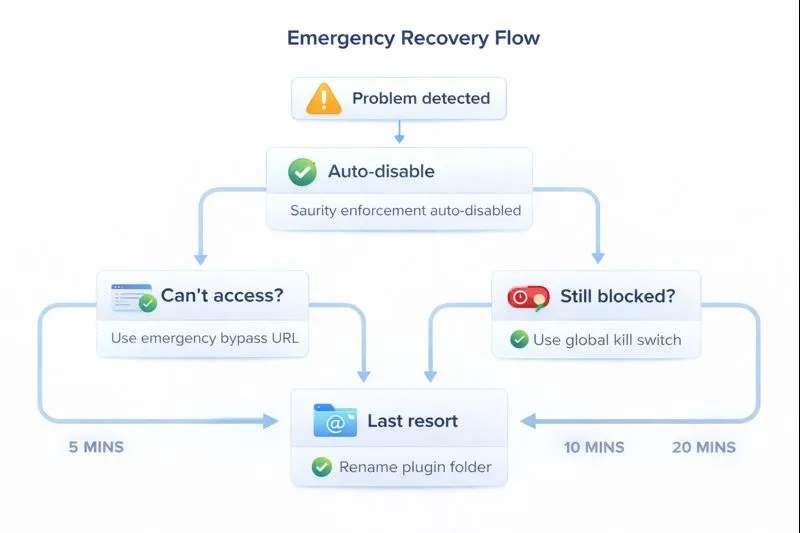
Emergency Bypass URL
Secret URL shown on activation that bypasses all protection. Bookmark it for emergency access.
Global Kill Switch
One-click disable in Settings → SAURITY. Instantly turns off all enforcement without deactivating the plugin.
Auto-Disable Protection
If admin lockout is detected, Saurity automatically disables itself. Your site accessibility comes first.
File System Recovery
Simply rename the plugin folder via FTP/SSH to disable completely. No database changes needed.
Fail-Open Architecture
If Saurity encounters any error or uncertainty, it always fails open (allows access) rather than failing closed (blocking access). This is fundamental to the zero-lockout guarantee.
Frequently Asked Questions
What is WordPress login security?
WordPress login security protects your wp-admin area from unauthorized access using techniques like rate limiting, progressive delays, and IP-based blocking to prevent brute force attacks while maintaining accessibility for legitimate users.
How does Saurity prevent brute force attacks?
Saurity uses progressive rate limiting with exponential delays. After 5 failed attempts in 10 minutes, each subsequent attempt is delayed by 2 seconds exponentially. After 20 attempts, the IP is hard-blocked for 1 hour. This stops automated attacks while rarely affecting real users.
Will Saurity lock me out of my WordPress admin?
No. Saurity has a zero admin lockout guarantee with multiple fail-safes: automatic disable on lockout detection, emergency bypass URL, global kill switch, and fail-open architecture. If something goes wrong, Saurity disables itself rather than blocking access.
What is progressive rate limiting?
Progressive rate limiting adds increasing delays after failed login attempts rather than blocking immediately. This approach reduces false positives (legitimate users with typos) while still effectively stopping brute force attacks through exponential time penalties.
How is Saurity different from other WordPress security plugins?
Saurity prioritizes stability over features. Unlike plugins that instantly block IPs or require CAPTCHA, Saurity uses progressive delays, fail-safe architecture, and includes emergency recovery tools. It focuses solely on login security without bloat.
Configurable Settings
All rate limiting parameters are adjustable in Settings → SAURITY.
Rate Limit Attempts
Number of failed attempts before throttling
Range: 1-20 attempts • Default: 5
Rate Limit Window
Time window for counting attempts
Range: 60-3600 seconds • Default: 600 (10 min)
Hard Block Threshold
Attempts before hard blocking IP
Range: 10-100 attempts • Default: 20
Hard Block Duration
How long to block after threshold
Range: 300-86400 seconds • Default: 3600 (1 hour)
Progressive Delay
Base delay for exponential backoff
Range: 1-10 seconds • Default: 2
Kill Switch
Globally disable all enforcement
Toggle: On/Off • Default: Off
Protect Your WordPress Logins Today
Free, open source, and designed to never lock you out. Install Saurity and stop worrying about brute force attacks.
Learn More
Rate Limiting Explained
Deep dive into sliding window rate limiting and why it works better than instant blocking.
Read more →Full Documentation
Complete installation, configuration, and troubleshooting guide on GitHub.
Read docs →Get Support
Have questions? Report issues or get help from the community on GitHub.
Open issue →