WordPress Rate Limiting Done Right
Progressive throttling with sliding windows stops brute force attacks while protecting legitimate users from false positives.
View DocumentationWhat is Rate Limiting?
Rate limiting controls the frequency of actions to prevent abuse while maintaining accessibility.
The Problem
Brute force attacks attempt thousands of login combinations per minute. Without rate limiting, attackers can try:
- •100+ passwords per minute
- •6,000+ attempts per hour
- •144,000+ attempts per day
- •Unlimited attempts until successful
The Solution
Rate limiting restricts attempts to a reasonable threshold:
- ✓5 attempts per 10 minutes (default)
- ✓Exponential delays after threshold
- ✓Hard block only after extreme abuse
- ✓Legitimate users rarely affected
Sliding Window vs. Fixed Window
Saurity uses sliding window rate limiting for more accurate and fair throttling.
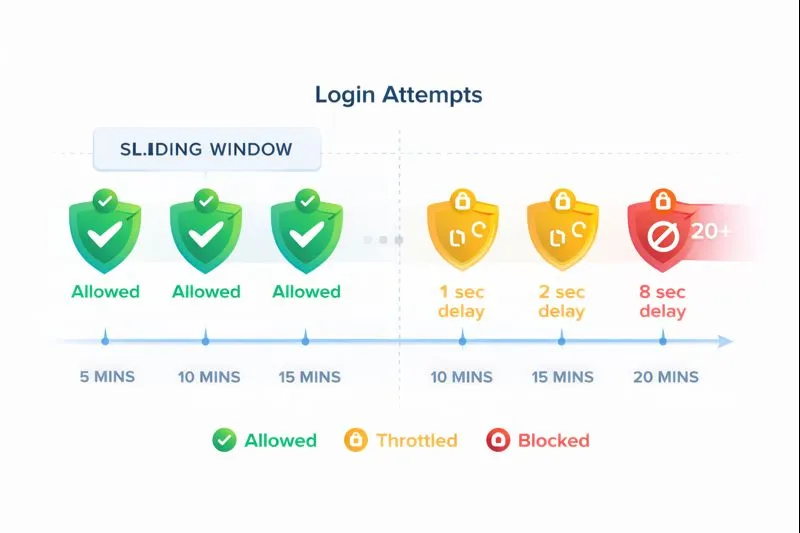
Fixed Window (Not Used)
Window 1: 12:00-12:10
5 attempts allowed
Window 2: 12:10-12:20
5 attempts allowed
Problem: Attackers can make 10 attempts by timing requests around window boundaries (5 at 12:09, 5 at 12:10).
❌ Exploitable boundary loophole
Sliding Window (Saurity)
Any 10-minute period
5 attempts maximum
Continuously tracked
No boundary resets
Benefit: Tracks the last 10 minutes continuously. No matter when attempts are made, only 5 are allowed in any 10-minute span.
✓ No exploitable loopholes
How Saurity Implements Rate Limiting
Three-layer approach: tracking, throttling, and blocking.
1
Per-IP Attempt Tracking
Every failed login is tracked by IP address using WordPress transients with automatic expiration.
// Transient key structure
saurity_login_attempts_192.168.1.1
// Value: array of timestamps
[1704628800, 1704628860, 1704628920, ...]
// Auto-expires after window (600 seconds)
2
Exponential Backoff
Once threshold is exceeded, delays increase exponentially:
Attempt 6
2s
Attempt 7
4s
Attempt 8
8s
Attempt 9
16s
Formula: delay = base_delay × 2^(attempts - threshold)
3
Hard Block (Last Resort)
Only after extreme abuse (20+ attempts by default) is the IP temporarily hard-blocked.
Block Threshold:20 attempts
Block Duration:1 hour
Implementation:Transient flag
Hard blocks are deliberately conservative. Most attacks are stopped by progressive delays long before reaching this threshold.
Why Use WordPress Transients?
Transients provide the perfect balance of performance, simplicity, and reliability for rate limiting.
Advantages
- ✓No Custom Tables
Uses WordPress core functionality, no schema changes
- ✓Automatic Expiration
Data cleans itself up, no cron jobs needed
- ✓High Performance
Optimized for fast reads, can use object cache
- ✓Clean Uninstall
Automatically removed with plugin deletion
Considerations
- ⚠Cache Clearing
Aggressive cache clearing may reset counters early
- ⚠Not Persistent
Counters reset if cache is flushed (by design)
- ⚠Shared Hosting Limits
Some hosts restrict transient size, but 5-20 timestamps fit easily
Note: These are fail-safe features, not bugs. If cache clears, counters reset and legitimate users can access immediately.
Per-IP vs. Per-User Rate Limiting
Saurity uses per-IP tracking to protect against distributed attacks while maintaining simplicity.
Per-IP Tracking (Saurity)
Tracks failed attempts by IP address, regardless of username attempted.
✓ Advantages
- • Simple implementation
- • Stops distributed attacks from single IP
- • No username enumeration needed
- • Works even for non-existent users
⚠ Limitations
- • Shared IPs (offices, VPNs) affect multiple users
- • Distributed attacks from many IPs harder to stop
- • NAT networks may share IP
Per-User Tracking (Not Used)
Would track failed attempts per username, regardless of source IP.
✓ Advantages
- • Better for shared IPs
- • More granular control
- • Each user has own limit
✗ Disadvantages
- • Distributed attacks from many IPs unaffected
- • Username enumeration risk
- • More complex implementation
- • Doesn't protect non-existent users
Why Per-IP is Sufficient
For v0.1, per-IP tracking provides the best balance of security and simplicity. Most brute force attacks come from single IPs or small botnets. Per-user tracking may be added in future versions for high-security environments.
Rate Limiting Configuration
All parameters are configurable to match your security requirements.
Attempts Threshold
Number of failed attempts before throttling begins
Range1-20
Default5
Time Window
Duration of the sliding window in seconds
Range60-3600s
Default600s (10 min)
Progressive Delay
Base delay for exponential backoff
Range1-10s
Default2s
Hard Block Threshold
Attempts before temporary IP block
Range10-100
Default20
Frequently Asked Questions
What is rate limiting?
Rate limiting controls how many requests (like login attempts) can be made in a specific time period. It prevents brute force attacks by limiting the rate at which attackers can try password combinations.
How does sliding window rate limiting work?
Sliding window rate limiting tracks requests within a rolling time window. Unlike fixed windows that reset at specific times, sliding windows continuously track the last N minutes of activity, providing smoother and more accurate rate limiting.
Why use transients for rate limiting?
WordPress transients provide high-performance temporary storage that automatically expires. This eliminates the need for custom database tables and scheduled cleanup tasks, while still providing the speed needed for rate limiting checks on every login attempt.
Get Started with Saurity
Progressive rate limiting that stops attacks without blocking legitimate users.